.svg)
.svg)

Book a free strategy call
Book a call

.svg)
.svg)
.svg)

Most sales teams use AI the same way. Open ChatGPT. Paste a prompt. Copy the output. Repeat.
That works for a while. 10-20% productivity boost. But it doesn't get you to 2-10x productivity. It doesn't work for account planning, pipeline reporting, or contract management. Those tasks need data from your CRM, meeting transcripts, proposal databases and document storage. A chatbot can't reach any of it.
Claude Code skills are different. A skill is a reusable workflow that connects directly to your tools. CRM, meeting recorder, e-signing platform, proposal database. One command triggers the whole chain.
We built six of them for our own B2B sales process. Here's exactly what they do, what they replaced, and how long each takes now.
A Claude Code skill is a set of instructions stored in a SKILL.md file. When you run a slash command like /account-plan, Claude reads the instructions and executes the workflow. It calls APIs, reads files, queries databases, writes documents and sends emails.
The difference from a ChatGPT prompt: a skill remembers how your process works. It knows your CRM schema, your document templates, your email format. You don't re-explain context every time.
For sales teams, this means the repetitive ops work that eats 5-10 hours per week can run in minutes. The AI handles data collection, formatting and admin. You handle the judgment calls.
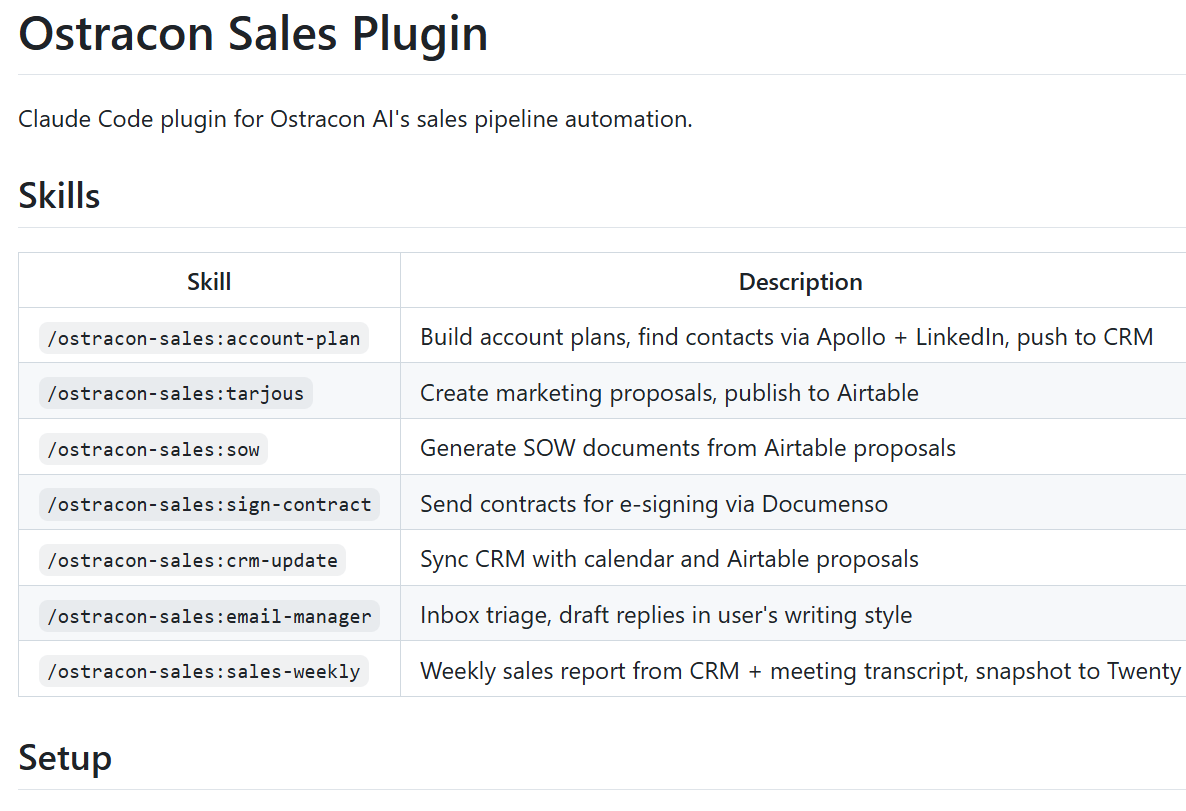
Here's what our sales plugin looks like. Seven skills, each handling a different part of the sales pipeline:
Account planning should be the highest-value activity in B2B sales. In practice, it's 80% data collection and 20% thinking.
Here's what the manual process looked like:
That's 2-3 days per account. With larger clients, easily a full week.
Now it works like this. You pick a client from CRM. The skill pulls company data and existing contacts automatically. Apollo.io's API finds missing decision-makers. Marketing directors, commercial leads, C-level. A LinkedIn agent enriches each profile. Current roles, responsibilities, recent activity. Claude builds an account-specific growth strategy. Why this company, which decision-makers, what angle, what timing. New contacts get pushed to CRM. Personalized outreach emails draft into Outlook. Ready to review and send.
The whole process takes about 15 minutes. The salesperson spends time on the strategy, not on data entry.
Tools connected: Twenty CRM, Apollo.io, LinkedIn, Outlook
Every week, same routine. Open CRM. Walk through the pipeline. Compare to last week. Write a summary. Add meeting notes. Send to the team.
An hour of work that repeats 52 times a year. The output is useful. The process isn't.
The skill pulls the entire pipeline from CRM. Opportunities, stages, amounts. It loads last week's snapshot for comparison. Changes calculated automatically. Deals won, lost, stage movements, new opportunities, value changes. From the meeting recorder API, it grabs the latest sales meeting transcript. Action items come straight from the conversation. The user adds context: reasons for losses, next steps on big deals, CRM corrections. The finished report generates as a Teams message. A new pipeline snapshot saves to CRM Notes for next week.
Pipeline data based on actual CRM records and meeting transcripts. Not memory-based estimates written in a rush on Friday afternoon.
Tools connected: Twenty CRM, Fireflies, Microsoft Teams
Writing proposals should be fast. It never is.
You have a client meeting. You understand their situation, their problems, what they need. Then you sit down to write the proposal. You realize you need to reconstruct the conversation from memory. Details slip. Scope creeps. Half a day disappears.
The skill pulls the latest client meeting transcript from Fireflies. Context comes from the conversation, not from memory. Claude drafts the full proposal. Situation overview, proposed scope, deliverables, timeline and pricing. You review and iterate together. Additions, cuts, tone adjustments. When it's ready, one command publishes it to Airtable. An automation picks up the data and publishes it as a branded web page.
Proposal quality depends on how well you understand the client's situation. When context comes from the actual transcript instead of notes scribbled during the meeting, proposals land closer to what the client actually needs.
Tools connected: Fireflies, Airtable, Claude Code
The proposal is approved. The client wants to start. Now you need a Statement of Work. Scope, deliverables, timeline, payment schedule, terms.
It's 15 minutes of copy-paste from the proposal, formatting and PDF export. Boring enough that it sits on the to-do list for a day or two.
The skill pulls the approved proposal from Airtable. All deliverables, phases and pricing come directly from the proposal data. It asks for specifics: payment schedule, start date, special terms. Claude generates a complete SOW document using Ostracon's branded template. The document exports as a PDF with embedded fonts and logos. The finished PDF saves to the client folder.
From approved proposal to signed-ready SOW in about two minutes.
Tools connected: Airtable, PDF generation (WeasyPrint)
The contract is ready. The PDF is in the folder. Then you need to open the e-signing platform, upload the file, add signers, position signature fields and send.
Small task. But one of those that always gets pushed to tomorrow.
The skill finds contract files in the client folder. Frame Agreement, SOW or both. You pick which document to send. It uploads via the Documenso API with signature fields on the last page. Signers get added. Names and emails. The contract goes out for e-signature with one command.
Thirty seconds instead of sitting on the to-do list for a day or two.
Tools connected: Documenso, SharePoint/OneDrive
Every sales leader knows the problem. CRM data decays the moment it's entered. Contacts change jobs. New stakeholders show up in meetings but never make it into the system. Opportunities exist in someone's head but not in the pipeline.
The fix is always the same: "everyone needs to update CRM." Nobody does.
This skill approaches it differently. It cross-references your calendar with your CRM. Every external meeting gets checked. Does the company exist in CRM? Do the attendees? Is there an open opportunity?
The skill pulls two weeks of calendar data from Microsoft 365. Filters out internal meetings. For every external meeting, it matches the domain against CRM companies using fuzzy logic. "elisa.fi" matches "elisa.com." "teliacompany.com" matches "telia.fi."
Then it checks: are the meeting attendees in CRM as contacts? Is there an open opportunity for this company?
It scores each contact before suggesting additions. A 1:1 meeting about a proposal review scores high. Being one of 23 attendees in a weekly standup scores low. Only relevant contacts get suggested.
The output is a structured report. Companies without opportunities. Contacts missing from CRM. Domain mismatches. Empty fields. With one confirmation, the skill creates missing companies, adds contacts, opens opportunities and fixes domain records.
CRM that stays current without anyone manually updating it.
Tools connected: Twenty CRM, Microsoft 365 Calendar, Airtable
ChatGPT prompts are good for one thing: generating text from context you provide manually. That covers about 20% of sales ops work.
The other 80% is moving data between systems. CRM to document. Transcript to proposal. Proposal to SOW. SOW to e-signing. None of that works with prompts.
Skills handle the full chain. They read from your CRM, pull meeting transcripts, generate documents in your brand template and push results back to where they belong. The AI doesn't just write. It operates.
A Claude Code skill is a markdown file called SKILL.md in a folder under ~/.claude/skills/. It contains:
The format is straightforward. If you can write a process document, you can write a skill.
The hard part isn't the skill itself. It's mapping your sales process clearly enough that an AI can follow it. Which systems hold which data. What order things happen in. Where human judgment is needed vs. where automation handles it.
That mapping exercise alone makes your sales process better, even before the skill runs.
A Claude Code skill is just a folder with a SKILL.md file. That folder lives in a git repository. This means skills are shareable, version-controlled and installable.
Your team builds a skill that works. Push it to a repo. Anyone on the team clones it and runs the same workflow with one command. Update the skill? Push a new version. Everyone gets it.
This is how plugins work in Claude Code. A plugin is a skill published as a git repo. Install it with one command. It shows up as a slash command in your terminal. No app store, no marketplace, no approval process. Just git.
For sales teams, this means:
The skills we built for our team are already packaged as plugins. Any team with similar tools can install and adapt them.
These six skills save our part-time five-person sales team roughly 70-80 hours per week on sales operations. More than a 2x productivity boost. Account plans that took days now take minutes. Weekly reports build themselves from real data. Proposals start from actual meeting context instead of memory.
The pattern works for any B2B sales team with a CRM, meeting recorder and document workflow. The specific tools don't matter. The approach does.

.svg)
.svg)