.svg)
.svg)

Book a free strategy call
Book a call

.svg)
.svg)
.svg)

12 (ish) minute read, that's about one bus drive.
Workflow automation tools connect your marketing and sales processes so work happens automatically in the background. This frees up your team to focus on strategy instead of shuffling data or fixing errors.
Zapier is great for “anyone who doesn’t want to touch a line of code”, Make excels at “doing everything Zapier can, but prettier”, and Workato gives you “automation superpowers if you have a Fortune 500 budget.” Reading about which workflow automation tool you should use can make it seem like the only possibility is to learn them all.
Choosing which tool to use is like buying a car for the first time. Each manufacturer promises absolute superiority over the others. Your friend who has only ever driven an Audi swears it is the only sensible choice and, somewhat ironically, lectures you on how everything else is a waste of money.
Meanwhile, the guy without a driver’s license somehow has the loudest opinions. To make it even more confusing, there are people who insist on driving a monster truck through city traffic.
In other words, there is no shortage of noise or strong opinions. Also, you are a marketing professional, which means you need to invest your time, money, and effort in a tool that will actually deliver on the kinds of tasks you face every day.
In this article we will cover five of the many workflow automation tools available today: Zapier, Make, n8n, Workato and Power Automate. Why five, and why these specific five?
These are among the most popular options on the market, so there is a good chance you have already come across at least some of them or will at some point. More importantly, they are tools we at OstraconAI have used extensively. That experience allows us to confidently explain how they differ, where each one excels, and what you should consider before investing your time and resources into them.
Workflow automation tools can also be called integration platforms, no-code automation software, or process automation systems. Some people even refer to them as connectors or app-to-app automation tools. For added clarity, the term iPaaS is also sometimes used.
To be clear, workflow automation tools are platforms that connect different apps and services to automate repetitive tasks, helping teams save time and reduce errors. These tools allow you to create workflow automations. Think of them like paths through which information travels.
They can be very simple, like a workflow that takes data from Google Sheets, sends it to ChatGPT for processing, and then drops the result back into another Google Sheet:
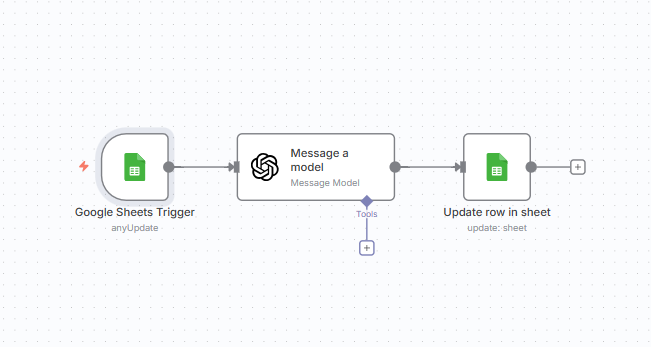
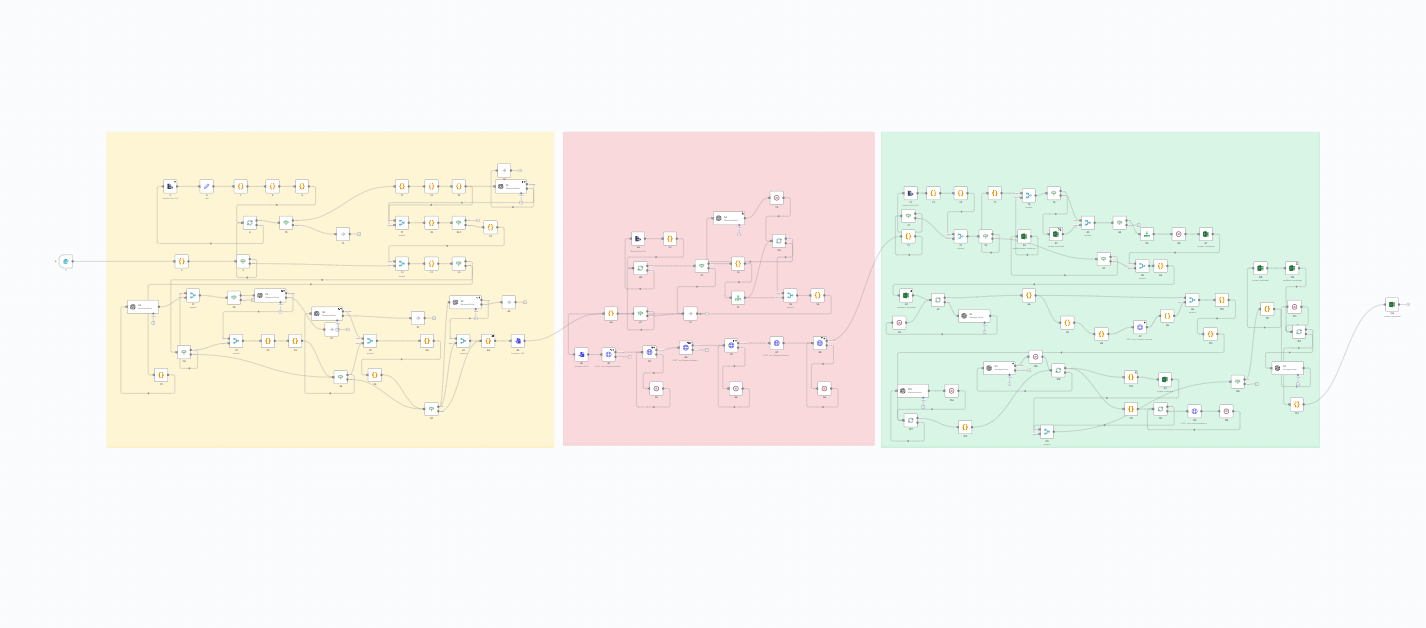
The end goal is always the same: to move information between systems so your team can skip some of the manual and repetitive tasks and focus on more creative and strategic work.
Workflow automation can completely change how marketing and sales teams work by taking the dull, repetitive stuff off your plate and letting you focus on strategy and creativity. Once you build an automation, it works tirelessly in the background so you can scale your efforts without scaling your workload.
At its core, workflow automation gives you three superpowers: speed, stamina, and consistency. Who wouldn’t want that!
By combining these benefits, marketing and sales teams can work more efficiently and make smarter decisions while avoiding the mind-numbing repetition that used to eat up their time.
We’ll now dive deeper into what makes each tool tick and how to know if it’s a match for your team.
Among automation tools, Zapier plays the role of Spider-Man: fast and approachable, ready to help with everyday tasks. It’s best suited for individuals and small teams who need quick, straightforward automations rather than highly customized solutions.
Strengths:
Zapier’s greatest strength is its ability to get workflows up and running in minutes. Its intuitive interface and extensive library of integrations cover nearly every popular tool, making it easy to automate repetitive tasks like syncing leads or posting to social channels without setup complexity.
Weaknesses:
Its limitation appears as workflows grow. While Zapier does support multi-step automations and team features, it isn’t designed for managing large-scale, organization-wide processes. Complex automations can become harder to maintain, and governance tools are limited compared to enterprise platforms.
Make is the Iron Man of automation: inventive and powerful. Its drag-and-drop interface appeals to people who want to see their processes mapped out like a blueprint. This visual clarity is especially valuable for teams running multi-channel campaigns where every step needs to be tracked and optimized.
Strengths:
Its strength lies in how it combines flexibility with a clear visual structure. Make handles complex automations with lots of steps and conditions. Everything stays visual and easy to track. This makes it a strong option for marketing teams balancing sophistication with usability as they scale campaign operations.
Weaknesses:
The challenge comes with scale. As workflows get bigger, they can become messy and break easily. Advanced features may also require technical expertise, creating a barrier for teams without process discipline or development resources.
If automation tools were magicians, n8n would be Doctor Strange: powerful and a bit intimidating at first. It’s an open-source platform that gives technical teams full control over their automation environment, whether self-hosted or in the cloud.
Strengths:
The true power of n8n comes from its customizability. It provides pre-built nodes for common tasks while allowing developers to extend functionality with code, making it ideal for specialized workflows like advanced attribution modeling or complex data enrichment. Being open source also means teams maintain independence and avoid vendor lock-in.
Weaknesses:
While n8n has a cloud version that works well out of the box, its flexibility makes it more technical than plug-and-play solutions like Zapier or Make. Teams without development expertise may find its features overwhelming, especially when designing advanced automations or managing a self-hosted instance.
Workato takes on the Captain America role: structured and disciplined. It’s designed for enterprises that need to connect multiple departments under a single automation framework with strict governance and control.
Strengths:
Its strength lies in enterprise-grade features. Role-based permissions and connections to platforms like SAP and Salesforce make it good for companies with strict compliance needs and complex processes across multiple teams.
Weaknesses:
Workato takes time to learn. Large setups need planning across teams and can require significant resources. Pricing matches enterprise needs, so it may not fit smaller marketing teams or test projects.
The Batman of automations, Power Automate is highly skilled within its own domain and unmatched when operating inside the Microsoft ecosystem.
Strengths:
Its strength is native integration with Microsoft products. Power Automate excels at automating internal processes like data synchronization and structured collaboration, streamlining repetitive marketing operations without requiring teams to leave their familiar environment.
Weaknesses:
Outside of Microsoft’s ecosystem, however, Power Automate is less effective. Its connections to non-Microsoft apps are limited, and it lacks the flexibility of more open, cross-platform automation tools, making it a specialist rather than a general-purpose solution.
Selecting a workflow automation tool is all about fit. Here is what you should keep in mind when deciding which way to go:
Integrations are the connections that let different apps talk to each other. They are the highways your data travels on, moving seamlessly from one system to the next. Zapier offers a huge library of ready-to-go integrations, which makes it incredibly easy to start automating right away. If you need something more specialized or completely custom, n8n gives you the flexibility to build your own connections without being boxed in by platform limits.
The easier a tool is to set up, the faster your team can see results. Some platforms, like n8n, have thriving communities filled with user-made tutorials and pre-built workflows. These resources can save you hours by giving you proven templates to copy and adapt to your needs. With strong documentation and a helpful user base, you can skip a lot of the trial and error and focus on creating workflows that deliver results.
Growth brings complexity, and not every tool is built to handle it. Workato is designed for enterprise-level teams that need advanced permissions, audit logs, and robust security features to keep operations running smoothly. Smaller, fast-moving teams might not need that level of structure yet, but once your company grows, having a platform built for scale becomes a must.
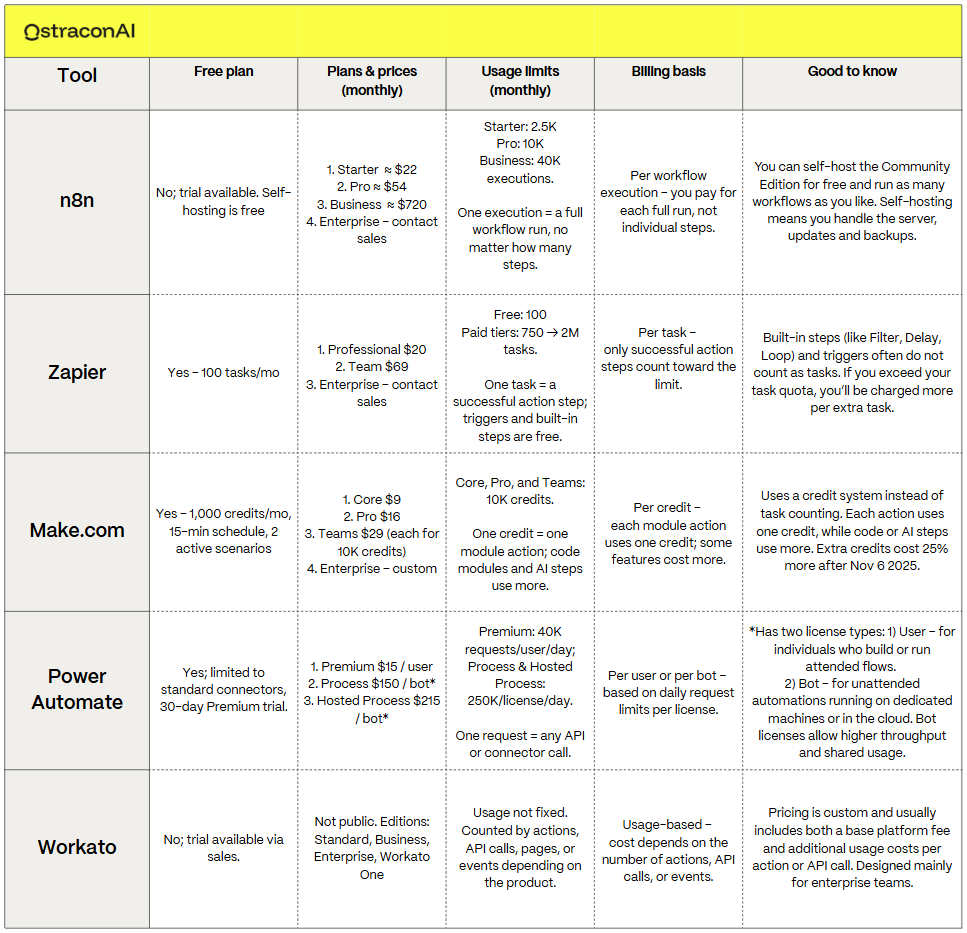
Pricing for workflow automation tools can vary wildly depending on your team’s needs. Some offer generous free plans that are perfect for experimenting with a few basic workflows, while others are designed for enterprise-level budgets from day one.
The table below gives a quick overview of what you can expect to pay for each platform, from starter plans to enterprise solutions. Use it as a baseline, but keep in mind that costs often scale based on usage, team size, and the complexity of your workflows.
Choosing a workflow automation tool is about finding the one that matches your team’s skills, processes, and goals. These platforms all have their strengths and differences, and each is designed to shine in different types of tasks.
Getting started can feel overwhelming. The first few automations may seem confusing or even a little intimidating, but it gets easier quickly. Once you understand the basics, the fun begins as you start to see how much of your daily work can be automated. That moment when you realize a repetitive task can run entirely in the background is when automation really clicks.
Be curious and experiment. Try out free plans, connect a few of your favorite tools, and build something simple. The right choice depends on your team and what you need to automate. As you learn, you'll figure out which one works best for your team.
The key is to start small, stay curious, and keep exploring. The more you experiment, the more time you will free up for strategy, creativity, and campaigns that make a real impact.
Well done, you’re almost in the end! Here’s a quick refresher to tie it all together:
It’s software that automatically connects your processes, moving data between tools without manual work. This keeps e.g. campaigns running smoothly and reduces repetitive, error-prone tasks.
To save time, reduce mistakes, and launch campaigns faster. Automation lets your team focus on strategy and creativity instead of repetitive admin work.
Zapier and n8n both have free plans. Make offers affordable plans for small and medium-sized businesses. Workato and Power Automate are designed and priced for larger companies and enterprise needs. Check the table above for more information.
Zapier is the most beginner-friendly. Make follows closely for teams that want a visual interface. n8n and Workato require more technical expertise.
Track hours saved, fewer mistakes, and faster campaign execution. Translate these into cost savings or added revenue to get a clear ROI picture.
What is the best automation tool for my marketing and sales team? We don't want to tell you that it depends, but it does. If this article didn’t provide you with all the answers you were looking for, we’re happy to help you further.

.svg)
.svg)
.png)